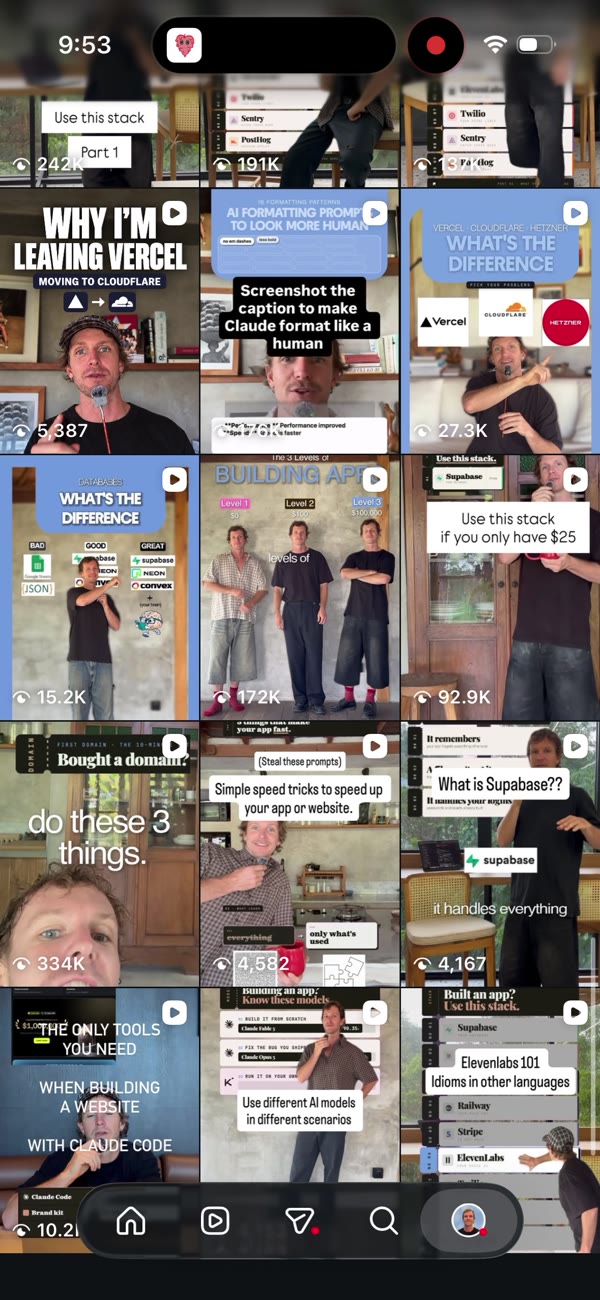
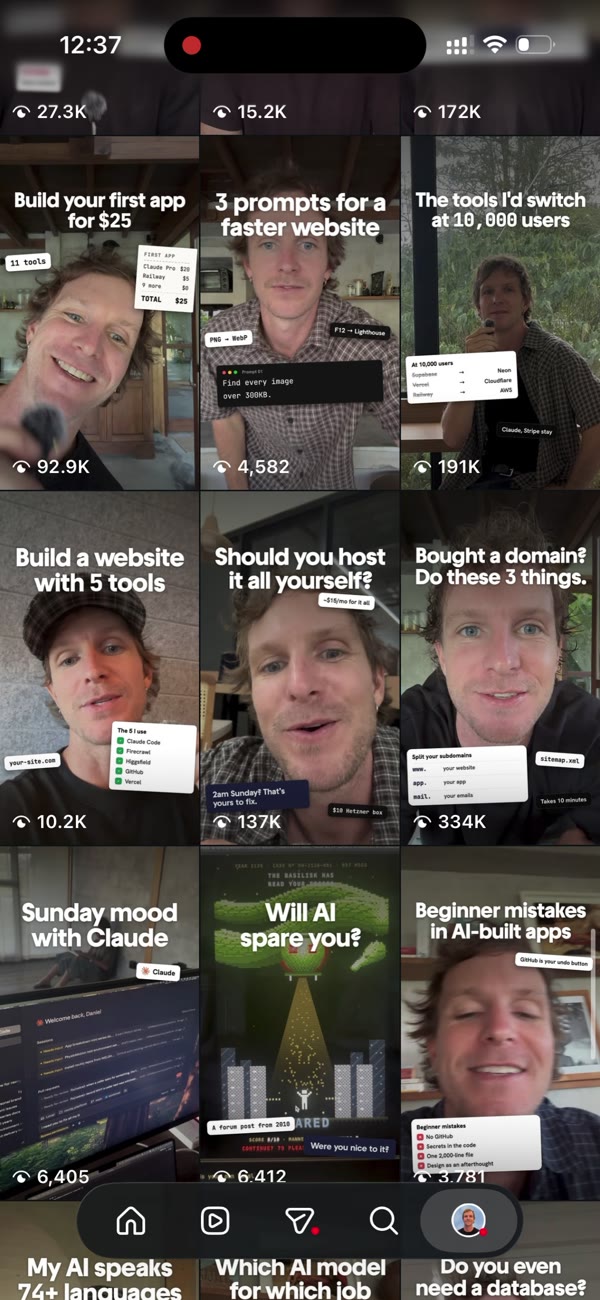
I had 21 reels and no plan behind any of the covers. Claude redid every one, in the same order, and none of the old ones stayed. Here is each step and the prompt for it.
You need Claude Code on a Mac, the original video files, and screenshots of your reels tab. No design tool. I tried one and did not need it.
Paste each one into Claude Code. Swap the bits in brackets for your own.
01
Pick a look to copy
Find two or three creators whose grids you would want. Screenshot their reels tab. You are not copying their content. You are copying what makes the grid feel like one thing.
01Look for the same shot on every tile. That does most of the work.
02One short headline per cover beats three lines of text.
03Do this first. I made 96 options before I found the look, and the look decided it in one message.
prompt-01.txt
Here are screenshots of three Instagram grids I love. Tell me what makes each one look consistent: the shot, the framing, the text, the colours. Then write me one cover style that does the same thing for my account.
02
Give it your brand kit
Without a brand kit, Claude designs like everyone else. Give it your fonts, your colours and the rules you care about, and it designs like you.
01Name the font files on your Mac so it can use them.
02Write the rules down, even small ones. Mine: never colour a single headline word, and no em dashes.
prompt-02.txt
This is my brand kit: [your fonts], [your colours], and these rules: [your rules]. Use it for every cover. If a design choice is not covered by the kit, ask me before you invent one.
03
A still from every reel
Claude never touched my Instagram. It worked from the original video files on my Mac. It matched each reel on my grid to the clip it came from, then picked the sharpest frame with my eyes open.
01Use the raw clips, before captions went on. Screenshots of the posted reel have text burned in.
02Keep your face the same size and in the same spot on every tile. This is why a grid looks planned.
03Ask for three options per reel on one contact sheet. Picking takes seconds.
prompt-03.txt
Here are screenshots of my reels tab, top to bottom. List every tile in order. My original videos are in [folder]. Match each reel to the clip it came from, and skip trial reels. For each one, use the Mac's built-in face detection to find the sharpest frame where my face is centred and my eyes are open. Show me three options per reel on a contact sheet. Then scale the chosen frames so my face is the same size and in the same spot on every cover.
04
A title from the transcript
Each cover says what that video actually covers, in plain words. If the video does not say it, the cover does not either.
01Two short lines. Big enough to read on the grid.
02Read it back as a stranger. Would they know what the video is about?
03My first pass drifted into clickbait. I made Claude redo every title from the caption.
prompt-04.txt
Read each reel's caption and transcript. Write a two-line cover title for each one, in plain words a small business owner would use. It must say what the video actually covers. No bait, and no claims the video does not make.
05
Stickers from the video
A small sticker or two makes a cover feel alive. Every one of mine is something real from that video: a tool I named, a line I said, a number I showed, a command I used.
01Mix the sizes. One small badge and one medium card works.
02Sticker text needs to be readable on a phone. About 34px on a 1080px cover.
03No made-up screens or sample data. It looks alive but it is not real, and people can tell.
prompt-05.txt
For each cover, add one to three small stickers using only real things from that video: a tool I named, a line I said, a number I showed, or a command I used. Mix the sizes, keep them off my face, and make the text big enough to read on a phone.
06
Mock the grid, then swap
Judge the covers together, not one at a time. A cover that looks fine alone can break the grid. Once the mock looks right, the swap takes minutes.
01Number the files in grid order, with 01 as the newest reel.
02AirDrop them to your phone, then Edit cover, Add from camera roll, one reel at a time.
03Screen record the before and after. That is your next reel.
prompt-06.txt
Render every cover at 1080 by 1920, numbered in grid order with 01 as the newest. Then mock up my reels tab on a phone with all of them in place, so I can see the whole grid before I change anything. Save the covers to a folder I can AirDrop.
03
Pulling your reels
Claude needs two things from Instagram: the list of your reels with their captions, and the videos if you no longer have the originals. There are two ways to get them. Neither one gives Claude your login.
Apify
Any public account
Every post's caption, link, date and view count, plus a direct download link for each video.
Make a free Apify account and run the Instagram Post Scraper with your username. Download the results as JSON and give the file to Claude. Claude can download each video from its link.
It reads public data only and charges a little per result. Posted videos have your captions burned in, so ask Claude for frames before the text appears.
Instagram's own API
Creator or Business accounts
Your reels with captions, links, dates and thumbnails, straight from Meta.
Connect your account to a Meta developer app once, then ask Claude to pull your media list with the token. Slower to set up, free to run.
It gives you thumbnails, not the original footage. If you still have your raw clips, use those for the stills. They have no text on them.
prompt-pull.txt
Here is a JSON export of my Instagram posts. List every reel in grid order, newest first, with its caption. For any reel where I don't have the original video in [folder], download the video from its link so you can pull a still from it.
04
What I would skip next time
The mistakes that cost me time, so they do not cost you any.
Going wide first
I asked for 100 options before I had a reference. The reference decided it in one message. Find it first.
A design tool on a free plan
I set one up and it capped out after 8 covers. Claude Code rendered all 21 on my Mac without it.
Bait titles
The first rewrite sounded good and said things the video did not. Every title now comes from the caption.
Fake proof
Sample business names and made-up tables looked alive. They were not real, so they came out.
Unreadable stickers
First they were too big. Then the text was too small to read on a phone. Check at phone size.
Someone else's draft
I started from covers another AI had made in lime green. Start from your brand kit and the reference instead.
The covers are the easy part. The work is deciding the look once, and then saying exactly what each video is about.